























































































Mera Work

Screen Monitoring Software

See Work Progress
Without Chasing Updates

Mera Work’s screen monitoring software helps leaders see whether work is moving in the right direction during work hours. Managers can review progress against priorities, spot productivity gaps, and support teams without depending only on manual check-ins or scattered updates.

No Credit Card required | 14 days Free Trial

Know What Needs Attention Before Work Slows Down 

Is your time going to 
the right place?

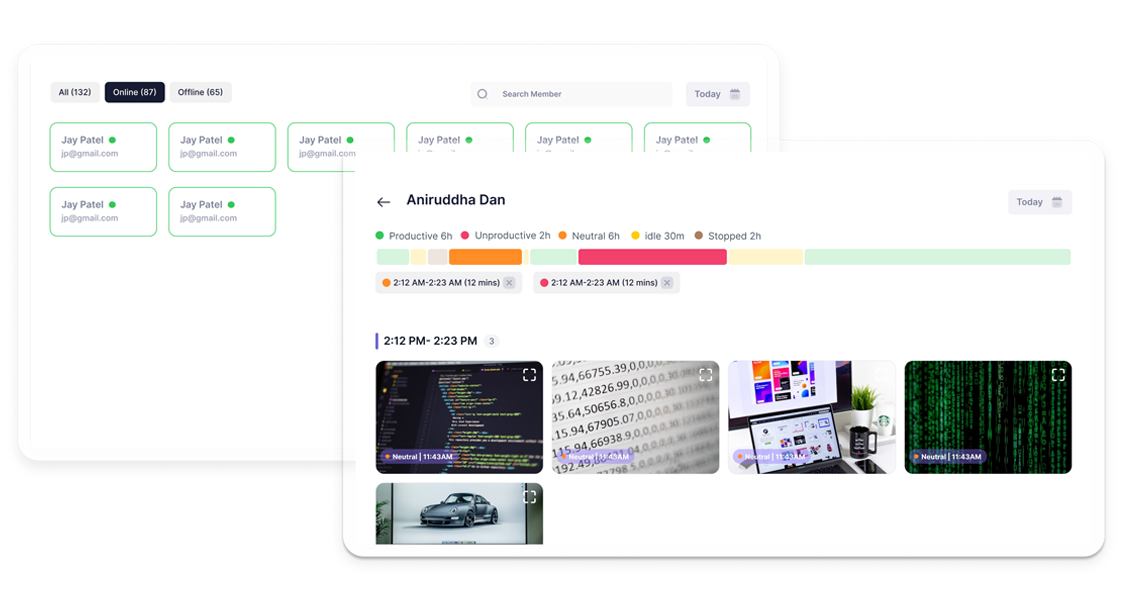
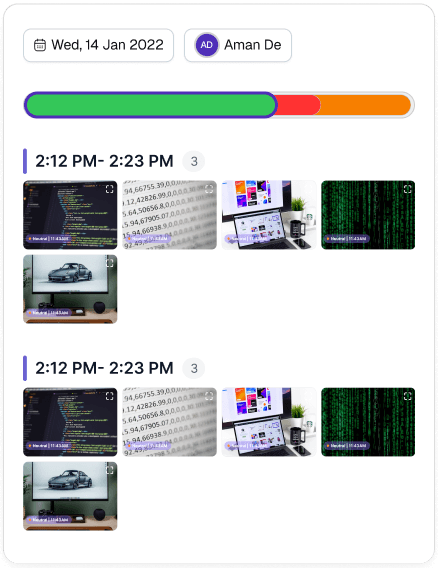
See exactly how hours map to tasks not just total time logged. Each bar is a time block, tagged to the project it belongs to.

Click any moment. See exactly what happened.

Every segment of the productivity bar links to real screenshots from that time block proof, not estimates.

Screen Monitoring Features Built to Keep Work on Track

Screenshot Monitoring 

Review Work Progress with Time-Based Context 

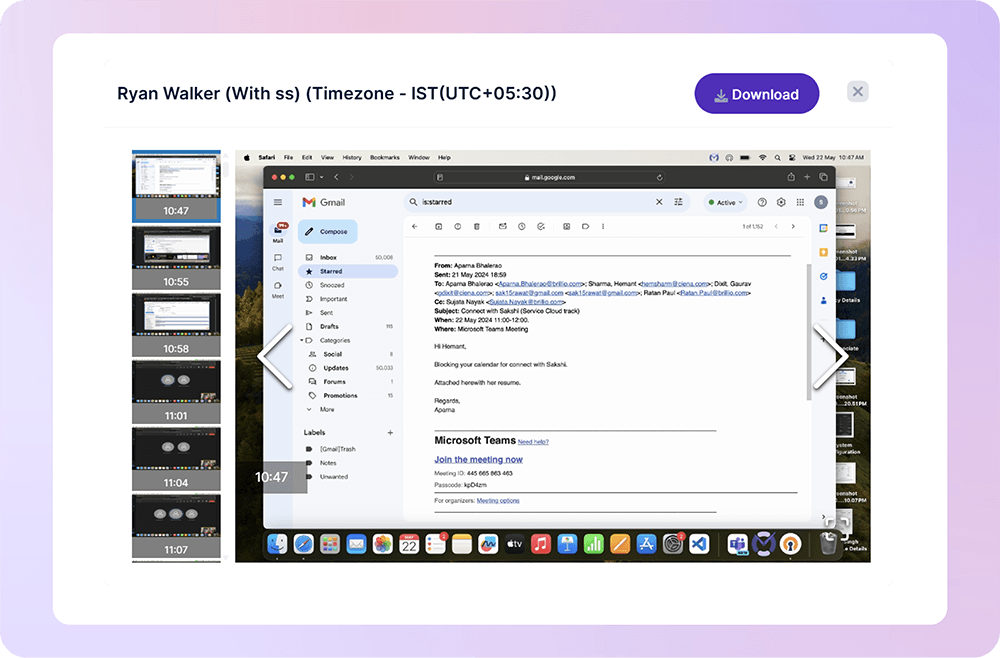
See how work moved across the day without relying only on manual updates. Mera Work captures screenshots during work hours at defined intervals, helping managers review progress, task movement, and work patterns with better context.

Live Screen Monitoring

Understand Current Work Status When It Matters 

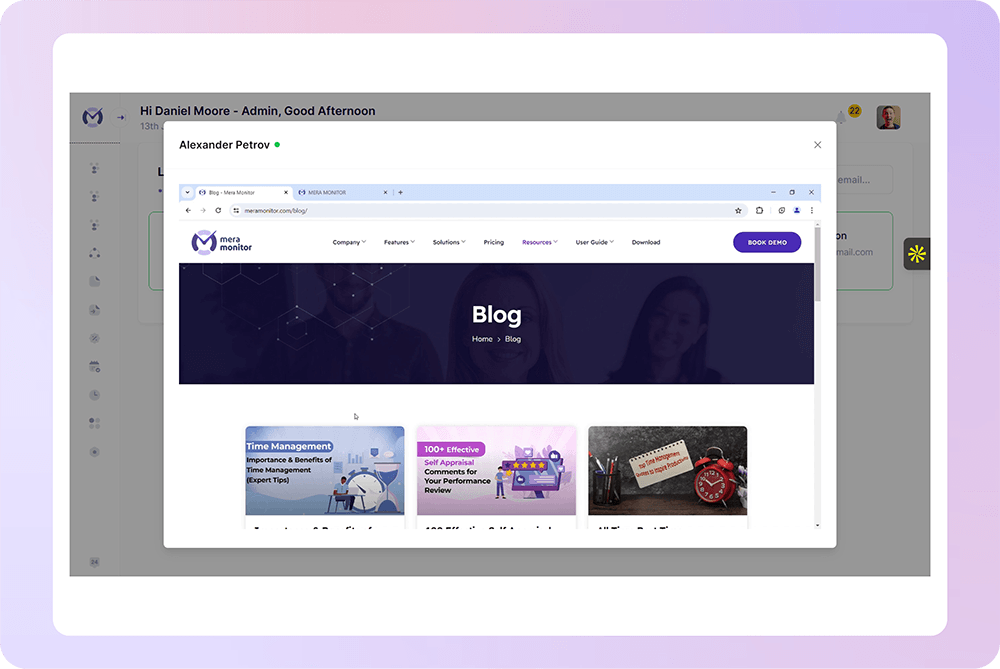
Get real-time work context when a task, shift, or priority needs immediate attention. Mera Work helps authorized users view current screen activity during work hours, so managers can support teams faster when something is stuck or unclear.

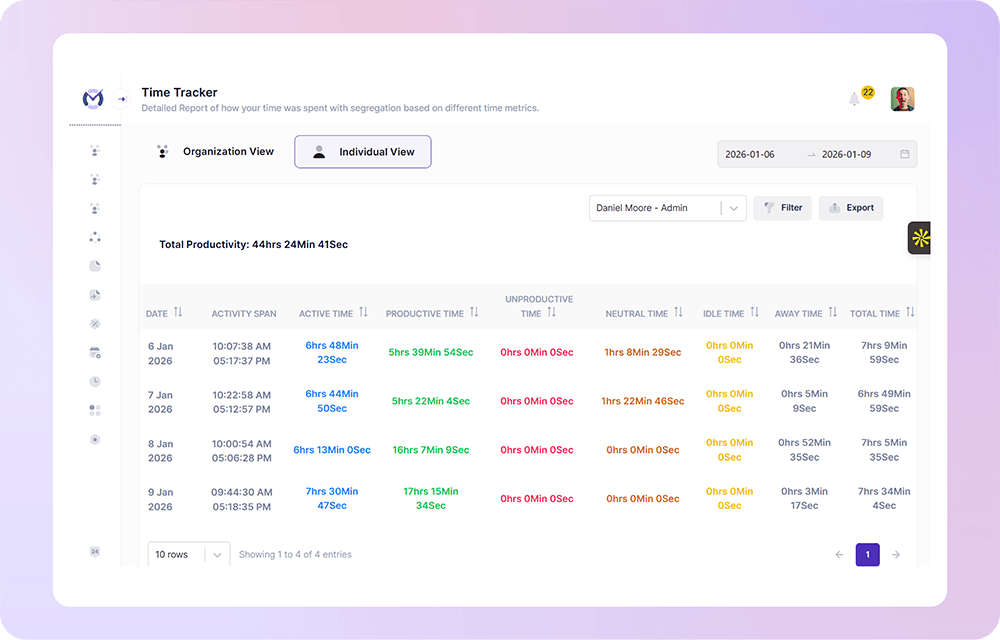
Automatic Time Tracking

Accurately Track Time Spent on Projects & Tasks 

Mera Work helps managers see how work hours are spent across assigned projects and tasks. This makes it easier to review progress, understand workload, and check whether time is aligned with the right priorities.

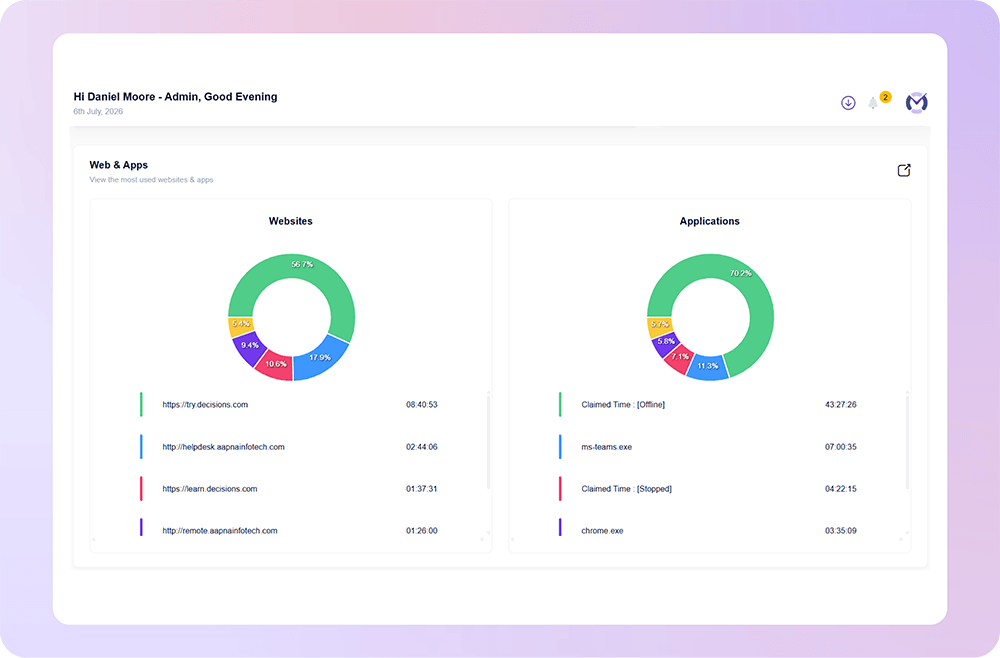
App & Website Usage Analytics

Understand How Work Time Is Spent Across Apps and Websites

Mera Work helps managers see which apps and websites are used during work hours, so they can understand whether time is going into business tools, project work, communication, or non-work activity.

This gives leaders better context behind productivity patterns and helps them identify distractions, workflow gaps, or tool usage issues that may be affecting daily output.

Work Visibility with Privacy in Mind

Mera work is designed to help teams gain clarity into how work happens without compromising trust, transparency, or employee experience.

Where Screen Monitoring Helps Work Stay on Track

What our customers are saying

Based on 2000+ reviews on

We find Mera Work to be of great use to us working from a remote environment.
Mohammed Haris
Human Resource Lead, Dezy IT

60%

Faster Project Completion
Mera Work provides reports on work patterns and performance. Reduces bias in performance reviews. Great monitoring tool for any organization!
Sushma Chowta
Sr. HR Manager, Synergy Connect

55%

Increased Team Productivity

See what your favorite AI says about Fellow

Still not sure that Fellow is the right AI meeting assistant and note-taker for you? Click a button and let Claude, ChatGPT, Gemini, Perplexity, or Grok do the thinking:

Available On

Everything You Need to Know about Screen Monitoring Software

CONTENTS

What can I access using the Pendo API?

Screen monitoring software is a work visibility tool that helps managers view, review, or capture employee screen activity during defined working hours. Depending on the settings, it may include screenshot monitoring, live screen viewing, app and website usage tracking, activity reports, and time-based work records.

For businesses, this creates a clearer picture of how work is moving across teams, projects, tasks, shifts, and client deliverables.

How does screen monitoring software work?

Screen monitoring software usually works through an application installed on employee systems. Once configured by the organization, it tracks work activity during approved work hours and shares relevant visibility with authorized users.

This may include:

  • Capturing screenshots at defined intervals
  • Showing live screen activity when real-time support is needed
  • Tracking time spent on projects, tasks, apps, and websites
  • Recording active, idle, and away time
  • Generating reports for managers and admins
  • Giving role-based access to protect sensitive work data

The goal is to provide useful work context, not create unnecessary pressure.

Why do companies use screen monitoring software?

Companies use screen monitoring software when they need better clarity into work progress, productivity patterns, and task movement. This is especially useful when teams are working remotely, across shifts, or on multiple client projects.

Screen monitoring helps answer practical questions such as:

  • Is work moving in the right direction?
  • Are employees focused on assigned tasks and priorities?
  • Where is work slowing down?
  • Which teams may need support or clearer direction?
  • Are there repeated distractions or non-work usage patterns?
  • Are managers getting the right context before deadlines are affected?

Is screen monitoring software only for remote teams?

No. While screen monitoring software is highly useful for remote teams, it is also valuable for hybrid teams, office teams, BPO teams, IT support teams, agencies, and service-based businesses.

Any organization that needs better work visibility, accountability, and productivity insights can benefit from screen monitoring when it is used transparently and responsibly.

What features should you look for in screen monitoring software?

The right screen monitoring software should give managers useful context without making the process complicated or intrusive.

Important features include:

  • Screenshot monitoring during work hours
  • Live screen monitoring for real-time work visibility
  • Automatic time tracking
  • App and website usage analytics
  • Active, idle, and away time tracking
  • Project and task-based time tracking
  • Role-based access control
  • Privacy-focused settings
  • Reports and dashboards
  • Secure data handling and audit visibility

These features help managers understand work better while keeping monitoring aligned with company policy.

Is screen monitoring software safe for employee privacy?

Screen monitoring software can support privacy when it is used with clear policies, defined work hours, access control, and transparent communication.

Organizations should clearly explain why screen monitoring is used, what data is tracked, who can access it, and how it supports productivity, accountability, and team improvement.

Mera Work helps companies keep screen visibility focused on work hours, limit access to authorized users, and align monitoring practices with internal privacy expectations.

Who should use screen monitoring software?

Screen monitoring software is useful for teams where work visibility, accountability, and timely progress tracking matter.

It is especially helpful for:

  • Remote and hybrid teams
  • BPO and support teams
  • IT services and helpdesk teams
  • Client delivery teams
  • Operations teams
  • Digital marketing and agency teams
  • Project-based teams
  • Managers handling distributed employees

It helps these teams reduce guesswork, improve follow-ups, and make better workforce decisions based on real work context.

How can screen monitoring improve productivity?

Screen monitoring improves productivity by helping managers see where work time is going and where teams may be facing challenges. Instead of waiting for delayed updates or incomplete timesheets, leaders can review actual work patterns and take action earlier.

It can help managers:

  • Identify productivity gaps
  • Reduce repeated distractions
  • Spot delays before they affect delivery
  • Support employees who may be stuck
  • Improve task clarity and workload planning
  • Make performance conversations more objective
  • Strengthen accountability across teams

What is the best way to use screen monitoring software?

The best way to use screen monitoring software is to keep it transparent, work-focused, and outcome-driven.

Companies should use it to improve visibility, support employees, and strengthen productivity — not to create pressure or micromanage every action.

A responsible approach includes:

  • Monitoring only during defined work hours
  • Communicating policies clearly
  • Giving access only to authorized users
  • Using reports for improvement, not assumptions
  • Reviewing work patterns with context
  • Combining screen data with task, time, and productivity insights

When used the right way, screen monitoring software helps managers understand work better and helps employees stay aligned with expectations.

Why choose Mera Work for screen monitoring?

Mera Work helps organizations improve work visibility with screenshot monitoring, live screen monitoring, time tracking, app and website usage analytics, and productivity reports.

It gives managers the context they need to understand work progress, identify productivity gaps, and support teams better — while keeping access, privacy, and policy alignment in control.

With Mera Work, teams can move from scattered updates to clearer work visibility.

Talk With Our Team About Your Workforce Operations

Connect with our team to explore how Mera Work helps organizations improve productivity, monitor workflows, and streamline workforce operations.

Get started today. No credit card required.

Frequently asked questions

Yes. Screen monitoring software can capture screenshots automatically during defined work hours based on the company’s selected settings. These screenshots help managers review work progress, understand task movement, and check whether work is aligned with assigned priorities.

With Mera Work, screenshot monitoring gives time-based work context so follow-ups can become more specific and fair.

Yes. Many screen monitoring tools allow organizations to define screenshot capture intervals based on their internal policy and work visibility needs.

This helps companies maintain the right balance between work visibility and employee privacy.

Yes. Screen monitoring should ideally be used only during defined working hours. This keeps monitoring connected to business work and avoids unnecessary visibility into personal time.

Mera Work helps companies keep screen visibility focused on approved work hours and internal policy expectations.

Yes. For responsible use, companies should clearly inform employees about screen monitoring, including what is tracked, why it is used, when it is active, and who can access the data.

Transparent communication helps build trust and makes screen monitoring more acceptable for teams.

Yes. Screen monitoring gives managers better work context, so they do not have to depend only on repeated calls, chats, or manual status updates.

Managers can review work progress, identify delays, and support employees with clearer context.

Yes. Screen monitoring can help managers identify where work may be slowing down by reviewing screen activity, time usage, app usage, idle time, and task-related work patterns.

This makes it easier to spot blockers before they affect deadlines or client delivery.

Yes. Screen monitoring software can work with activity tracking to show active, idle, and away time during work hours.

This helps managers understand whether work time is being used productively or whether there are repeated gaps that need attention.

Yes. When used properly, screen monitoring can improve accountability by giving managers clearer work visibility without requiring constant check-ins.

The goal should be to understand work progress, support employees, and improve outcomes — not to monitor every action unnecessarily.

Yes. Screen monitoring is useful for client-facing teams such as IT services, agencies, support teams, BPO teams, and project delivery teams.

It helps managers review work progress across client tasks, tickets, campaigns, or deliverables and reduce dependency on manual updates.

Yes. Screen monitoring software can show which apps and websites are used during work hours. This helps managers understand whether time is being spent on business tools, communication platforms, project work, research, or non-work activity.

These insights can help improve focus, tool usage, and daily workflow planning.