The modern workplace has changed a lot, over the last few years, honestly. Remote work, hybrid teams, cloud-based operations and digital collaboration tools have shifted the way businesses manage employees. Usual supervision approaches are no longer enough for companies working with distributed teams across multiple cities and other locations. Because of that, many businesses are now turning to employee monitoring software, aiming to boost output, keep workflow transparency and handle workforce performance in a more efficient way.
Employee monitoring software lets organizations follow work-related behavior such as attendance, actual working hours, application usage, productivity trends and task results. With these tools, managers get live views into how employees work day to day, so businesses can make better operational decisions, faster .
Today employee monitoring tools are not only used for watching employee work hours, more modern solutions focus on productivity gain, workflow refinement, data protection and managing remote teams, in a real continuous way. Many companies across different industries are turning to workforce monitoring software to raise efficiency, while still supporting flexible working arrangements.
This guide explains what employee monitoring software is, how it actually works, what main features to expect, the benefits and challenges, as well as where things are heading in the future trends .
What is Employee Monitoring Software?
Employee monitoring software is basically a digital tool that helps organizations track, log and analyze what employees do while they are on the clock. It gathers work-related data from company devices, then translates all that information into reports along with analytics so leaders can get a clearer picture of productivity levels and overall workflow efficiency.
In a more plain way, employee monitoring software lets a business see where working time actually goes and how effectively tasks get handled. Most modern employee tracking tools run in the background automatically, then generate updated, near real-time summaries for managers and HR teams.
These systems can watch a range of day to day work activities, like attendance, active versus idle hours, website activity, application usage, screen monitoring and project progress. Instead of older workplace supervision methods, today’s workforce monitoring software leans on automation plus AI-driven insight to strengthen decision-making and improve workforce visibility.
Remote and hybrid work environments have, in a big way, increased the need for employee productivity monitoring software, because businesses now want better visibility across distributed teams and all that. In practice it is more like they need sharper oversight day to day, even when people are not in the same physical space, so the software demand keeps growing faster than before.
Traditional Monitoring vs Modern Employee Monitoring
| Traditional Monitoring | Modern Employee Monitoring | Manual supervision | Automated tracking |
|---|---|
| Paper attendance | Digital reports |
| Limited visibility | Real-time analytics |
| Office-only management | Remote & hybrid tracking |
How Does Employee Monitoring Software Work?
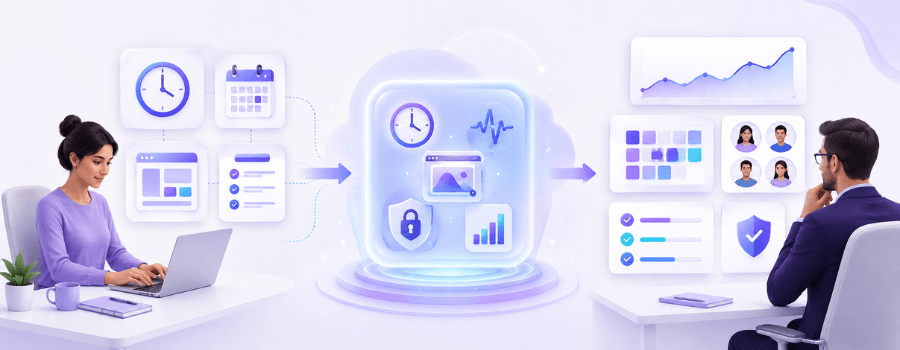
Employee monitoring software works by gathering employee activity data from company devices, cloud systems, or workplace apps and then it does a lot with that. Afterward it processes the information and generates reports that managers can use to gauge productivity and also raise operational efficiency a bit more.
At the start there is data collection. The software pulls together details like login and logout timings, how apps get used, which websites are visited, active work hours, plus idle time. For cloud based systems, monitoring remote employees is possible even when they are far away from the main office, like from anywhere.
After the data is collected it keeps watching work activity all day long. It tries to figure out how much time employees spend on constructive work against more weak, distracting activities. Some advanced setups may even include screen monitoring, plus screenshot capturing features, so there is more strong visibility and context.
Then modern employee productivity monitoring software uses AI and analytics to slice work activity into productive, neutral, or unproductive parts, because you know that does make sense. Managers can review productivity trends, work patterns and department outcomes using visual dashboards along with recurring reports which is pretty handy in day to day practice.
Lastly there is the final piece where the system generates insights, like attendance reporting, productivity analytics, app usage summaries and employee activity logs. With those results organizations can tune workflows, improve time management and raise overall operational efficiency.
Key Metrics Tracked by Employee Monitoring Software
| Metric | Purpose | Active Hours | Helps measure employee engagement |
|---|---|
| Idle Time | Detects inactivity |
| Productivity Score | Evaluates work efficiency |
| Attendance Rate | Tracks punctuality |
| App Usage | Identifies workflow patterns |
Main Features of Employee Monitoring Software
Modern work force monitoring software includes several features that are made to boost productivity, give more operational visibility and help in workforce management, too. It is often described as a kind of control dashboard for day to day activities, where teams can see what is happening and adjust faster.
Time Tracking
Time tracking is one of the most important features inside employee monitoring systems, it helps businesses keep an eye on working hours, also attendance, overtime and shift schedules all automatically. With automated tracking, fewer manual payroll mistakes happen and the workforce management becomes more stable and organized, maybe not perfect but much better.
Screen Monitoring
Screen monitoring lets managers look at employee screen activity while work hours are ongoing. With some tools you can do live screen watching, grab periodic screenshots or even keep screen recordings running. This option tends to be particularly valuable for remote groups, where physical supervision is limited.
Application and Website Tracking
This feature tracks which websites and applications the employees are using while they are working. Businesses can see what is more productive in the software, which pages are distracting and where the process has workflow inefficiencies. These findings help improve time management and operational efficiency, in general.
Productivity Analytics
Advanced employee tracking software is using analytics mixed with AI to measure how the workforce is performing. The whole system gives productivity scores, employee activity summaries and team performance reports, which help businesses to tweak their workflows more smoothly and yes maybe even more efficiently, than before.
Data Security Monitoring
A lot of organizations use employee monitoring software to strengthen their cybersecurity posture and limit insider threats. These monitoring tools can notice strange behaviors, unauthorized entry attempts and risky document transfers, all of which helps organizations safeguard private information.
Benefits of Employee Monitoring Software
Employee monitoring software gives businesses a handful of advantages, especially when they handle office, remote, or hybrid groups.
Improved productivity
A major gain is higher employee output. When work performance is measurable, people can be more intent on their tasks. Managers can spot workflow inefficiencies, time wastage and delayed deliverables more quickly too.
Stronger time management
Tracking tools let organizations see how employees use working hours. Companies can cut down unnecessary downtime, handle attendance more effectively and tune up project timelines through automated reports plus analytics.
Helps remote and hybrid teams
Remote monitoring software offers visibility across distributed environments. It can support monitoring of work activity, attendance tracking and stronger accountability for remote teams, all without needing to be physically present.
Boosts data security
Monitoring systems help organizations spot suspicious patterns and lower data security risks. This becomes more critical for sectors that manage confidential client or monetary records, because the stakes are higher.
Improves payroll precision
Automated attendance and time tracking reduces payroll mistakes by calculating work hours, overtime and shift presence more reliably. It also cuts down the HR department manual workload, so staff can focus on other tasks.
Helps reveal employee burnout
AI-based employee productivity monitoring software can flag signs of fatigue by looking at unusual schedules and continued overtime. Then, companies can move earlier with small adjustments, to support employee well-being.
Business Impact Metrics
| Benefit | Estimated Improvement | Productivity Increase | 20–30% |
|---|---|
| Attendance Accuracy | Up to 95% |
| Payroll Error Reduction | 40% |
| Manual Reporting Reduction | 60% |
Challenges and Ethical Concerns
Even though employee monitoring software bring many benefits, a clumsy implementation can create privacy and trust concerns .
- Employee Privacy Issues:- Too much tracking can make employees feel uncomfortable and it can really end up messing with their workplace satisfaction . Companies should make sure that the monitoring stays centered on job related tasks, not personal conduct. It is better to keep it about work performance rather than personal signals, because the overall mood at the office depends on that.
- Trust and Workplace Culture:- Hidden monitoring practices can slowly erode trust between employers and employees and that can feel really heavy over time. If the implementation is off, maybe too intrusive, it often turns into a stressful work environment and that can lessen employee engagement, sometimes quickly.
- Legal Compliance Risks:- Businesses have to comply with the local privacy laws and workplace regulations, when they use employee monitoring systems. In practice organizations should make sure employees get clear notice about the monitoring policies, also they need to keep the data securely stored. It’s best if the information is handled carefully and the storage is protected, so the employee information does not get exposed.
Ethical Monitoring vs Over-Surveillance
| Ethical Monitoring | Over-Surveillance | Transparent policies | Hidden tracking |
|---|---|
| Work-focused insights | Personal behavior tracking |
| Productivity improvement | Excessive surveillance |
| Employee awareness | No disclosure |
Types of Employee Monitoring Software
Different businesses run with different monitoring systems, depending on how they operate day to day and what they consider important.
Time tracking software usually zooms in on presence, attendance and work hour management. Productivity monitoring software leans toward workflow efficiency and also employee performance. Screen monitoring software captures screenshots, while keeping tabs on live activity for anyone who is on shift.
Some organizations also rely on security monitoring software, to safeguard sensitive company data and catch insider threats early. GPS tracking software is pretty common in field service businesses and logistics companies, it tracks mobile employees while they travel.
More recently, a lot of companies are leaning toward integrated workforce management platforms, where multiple monitoring features are stitched together into one setup, instead of scattered across separate tools.
Who Uses Employee Monitoring Software?
Employee monitoring tools show up across a lot of industries, where productivity, accountability and operational efficiency really matter, even if the reasons sound a little different from one team to the next.
Workforce tracking software is used especially by:
- IT and software companies
- BPO and call centers
- remote work businesses
- healthcare organizations
- financial institutions
- logistics companies
In these areas, they depend on employee tracking systems to drive higher output, manage time presence, streamline workflows and reinforce security in a more dependable way.
How to choose the right employee monitoring software ?
Picking employee monitoring software that fits best, really depends on what your organization wants to achieve and how your team works each day, in practice.
First, decide what you need right now, for example productivity tracking, attendance management, remote workforce visibility, or defenses for sensitive records. After that, take a close look at the reporting features such as whether the dashboards feel easy to navigate and if the platform can keep growing with you. Also think about what it connects to inside your current workflow, like integrations, whether it supports new job types or different departments and what compliance requirements you may have.
At the same time, organizations should place emphasis on transparency and monitoring practices that respect privacy. Responsible supervision often boosts adoption, while still protecting workplace trust, instead of making people feel uneasy .
When you look at pricing, most of these monitoring tools typically hang around 5 to 30 dollars per user per month, based on which features are bundled and how big your company is.
Future Trends in Employee Monitoring Software
Employee monitoring systems are evolving fast, with AI plus advanced analytics of workplace tasks becoming more common, not only in slide decks but in actual day-to-day work.
AI-driven productivity evaluation is getting adopted more often and it can assist organizations in detecting workflow slippage, anticipating performance patterns sometimes even sooner than people expect. At the same time, privacy-first monitoring is also appearing more frequently because a lot of firms are moving away from invasive surveillance behaviors, the sort that used to feel routine.
In the coming years, employee monitoring software may incorporate predictive analytics that can flag burnout dangers, notice thinning motivation and warn about decreasing productivity before it turns into a bigger issue.
More businesses are now leaning toward all-in-one workforce management platforms that bundle monitoring, insight reporting, payroll integration and project coordination together in one place instead of mixing tools and dashboards and that’s where it gets messy in practice. Some teams prefer one dashboard, other than stitching several separate panels, because it makes approvals smoother, at least in theory.
Conclusion
Employee monitoring software has turned into a kind of must-have solution for many modern businesses. Especially for teams working from the office, remote locations, or hybrid setups. These tools help organizations with productivity lifting, workflow streamlining, data security strengthening and also keeping a fair level of workforce transparency, you know.
Nowadays, employee tracking software is not only about surveillance anymore. The newer systems lean more toward real productivity growth, operational effectiveness and even employee assistance through intelligent analytics and simple reporting.
Still the rollout needs balance. Companies should keep things transparent, use ethical monitoringand respect employee privacy when they turn these systems on. If workforce monitoring software is used in a responsible way, it can help create more organized, productiveand team friendly workplaces.
And since remote and digital work settings keep growing, employee monitoring software should keep on playing a critical part in modern workplace management, you know more or less.
FAQ
What is employee monitoring software in simple words?
Employee monitoring software is a tool for companies to watch, in a practical way, what employees do during their day, like working hours, app usage and overall output, so the business can improve performance and manage teams more carefully and consistently.
Is employee monitoring software legal?
Yes, employee monitoring software is usually legal in most countries, as long as employers inform employees clearly, follow local labor rules and use the data only for business related reasons. In real life it works best when the policy is written properly, shared in advance and stays within what the law allows.
What can employee monitoring software track?
It can record working hours, attendance, how people use websites, application activity, idle times, screen behavior and also productivity results, depending on what exact tool is chosen.
Does employee monitoring software reduce productivity?
No, when it is used in an ethical way, it can enhance output by cutting distraction and improving time management plus increasing accountability at the workplace, though sometimes people don’t notice it right away.
What is the best employee monitoring software?
The best software depends on what your business needs, but most popular tools come with features like time keeping, productivity insights, remote monitoring and AI based reporting, which can help in everyday decisions.